An APA title page is a required first page for every APA 7 paper, and many students search for it as an APA cover page. A student title page has seven elements, in this order: the paper title in bold, your name, your affiliation (department and university), the course number and name, your instructor’s name, the assignment due date, and the page number in the top right corner. APA also publishes a title page setup guide that confirms a title page is required for all APA Style papers.
The professional version swaps the course details for an author note and a running head. Use the student version unless your instructor or institution asks for the professional one. This page is part of our APA format guide and covers both versions, with examples, formatting steps and common mistakes.
What goes on an APA student title page?
A student title page lists the paper title, your name, your affiliation, the course, your instructor, the due date and a page number. Every line except the title is plain text, centered, double-spaced and on its own line. The table gives each APA Style element with its rule and an example.
| Element | How to format it | Example |
|---|---|---|
| Paper title | Bold, title case and centered, three to four lines down from the top of the page. A subtitle goes on its own double-spaced line. | Effects of Sleep Quality on Academic Performance in College Students |
| Author name | First name, middle initial, last name, centered, one blank double-spaced line below the title. | Jordan A. Taylor Jr. |
| Affiliation | The department, a comma, then the university. | Department of Psychology, State University |
| Course | The course number as shown on your course materials, a colon, then the course name. | PSY 101: Introduction to Psychology |
| Instructor | The name and title the instructor prefers, as shown on course materials. | Dr. Morgan Lee |
| Due date | Month spelled out, in the date order used in your country. | November 15, 2025 |
| Page number | The number 1, top right corner of the page header, inserted automatically. | 1 |
Student papers have no running head unless the instructor or institution asks for one. The rules in the table come from APA’s Student Title Page Guide, which also says that if your instructor gives different directions, you follow those.
Your syllabus wins over any style guide, this one included. If your instructor’s template asks for a running head, a different date order or the instructor’s name above the course, copy the template and keep the APA formatting for everything it does not mention.
APA title page example for a student paper
The example below follows the table line by line. The page number 1 sits in the top right corner, and the bold title and subtitle are centered in the upper half of the page. Below them come the author name, the department and university, the course, the instructor and the due date, none of them bold.
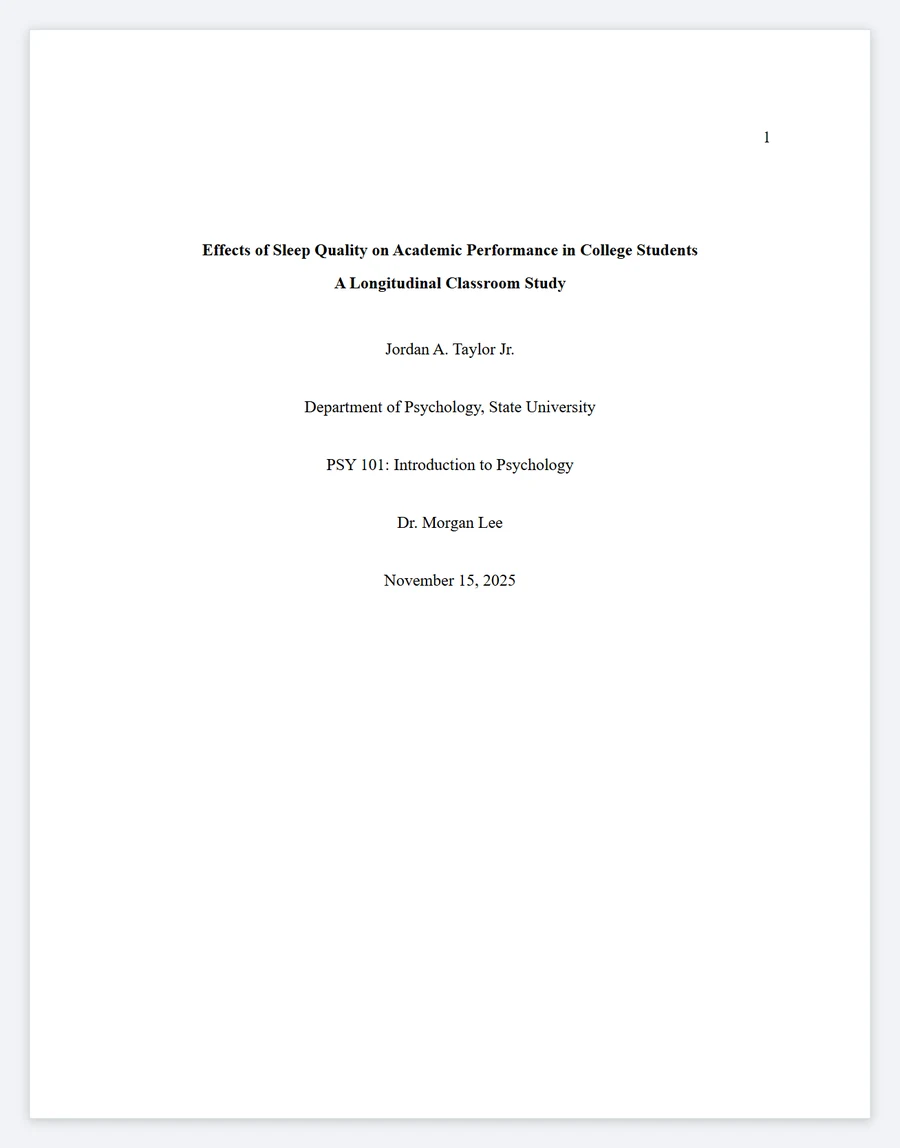
Make your title page: type your own details into the APA title page generator and copy the result into your document.
APA title page font, size and spacing
APA lets you use any one of several fonts, and the title page uses the same font as the rest of the paper. The font guidelines were last updated in February 2026 and list 12-point Aptos first, so Times New Roman 12 is not the only safe answer.
| Setting | APA rule for the title page |
|---|---|
| Sans serif fonts | 12-point Aptos, 11-point Calibri, 11-point Arial or 10-point Lucida Sans Unicode. |
| Serif fonts | 12-point Times New Roman, 11-point Georgia or 10-point Computer Modern. |
| Margins | 1 inch on all sides. |
| Line spacing | Double-spaced, with one blank double-spaced line after the title and none between the other elements. |
How to set up an APA title page in Word or Google Docs
Most formatting errors come from typing the lines before the page is set up. Set the font, margins, spacing and page number first, then type the title page lines, in this order, in Word, Google Docs or any other word processor.
- Pick one font from the table above and set it for the whole document. Your word processor’s default is usually on the list.
- Set 1-inch margins on all four sides.
- Set line spacing to double for the whole page.
- Insert the page number with the automatic page-numbering tool, aligned to the top right of the header. Never type the 1 by hand.
- Press Enter three or four times, then type the title. Bold it and center it.
- Leave one blank double-spaced line after the title, then type the author name, affiliation, course, instructor and due date, each centered on its own line.
Page number placement on an APA title page
The page header sits in the top margin of every page. On a student paper it holds the page number only. On a professional paper it holds the page number and the running head. Either way, the title page is page 1 and the number goes in the top right corner. APA’s page header guidelines ask you to use your word processor’s page-numbering function, which is why a typed 1 is flagged as a mistake below.
APA title rules: capitalization, subtitles and length
The title is the one element you can get wrong in several ways at once. APA’s guide asks for title case, and it defines the cases that trip people up.
| Rule | What it means |
|---|---|
| Title case | Capitalize the first word of the title and of any subtitle after a colon, plus every major word: nouns, verbs, adjectives, adverbs, pronouns and any word of four letters or more. |
| Hyphenated words | Capitalize both parts of a hyphenated major word, such as Self-Report. |
| Short minor words | Keep conjunctions, prepositions and the articles a, an and the in lowercase when they have three letters or fewer. |
| Is, be and with | Capitalize them. Is and be are verbs, and with has four letters. |
| Subtitle | Put the main title and the subtitle on separate double-spaced lines if you like, both in bold. |
| Length | APA sets no maximum length. It asks you to keep the title focused and to include key terms. |
Some guides quote a 12-word limit, but it is not in the APA title page guidelines, so do not cut a clear title to fit it. To check your capitalization, paste the title into a title capitalization tool and compare the result with the table. If you are still choosing the title itself, our guide on how to title an essay covers wording.
How to write author names on an APA title page
Author names are the line students most often get wrong, because the number of authors and name suffixes change the punctuation. APA’s student guide settles each case, and the table shows the exact form for one, two and three or more authors.
| Situation | What to write |
|---|---|
| One author | Jordan A. Taylor |
| Two authors | Ainsley E. Baum and Lucy K. Reid |
| Three or more authors | Riley S. Rodrigo, Dev M. Kumar, and Aidan T. Zhang |
| Name with a suffix | Separate the suffix with a space, not a comma: Jordan A. Taylor Jr. |
APA professional title page
A professional title page is for papers meant for publication or for a reader outside a course, such as a journal manuscript. It has the paper title, the author names (the byline), the affiliation or affiliations, an author note, a running head and the page number. It has no course, instructor or due date.
The title is bold, centered and three to four lines down, as on the student page, and the author names follow after one blank line. Each affiliation is the institution where the research was done, written as department then institution, on its own centered line. When authors have different affiliations, a superscript number after each name matches a number before each affiliation, and those numbers are left out if everyone shares the same affiliation.
| Where it goes | What it shows in this illustrative example |
|---|---|
| Page header, left | SLEEP QUALITY AND ACADEMIC PERFORMANCE (the running head) |
| Page header, right | 1 |
| Title, bold, centered | Effects of Sleep Quality on Academic Performance in College Students |
| Byline, centered | Jordan A. Taylor1 and Morgan Lee2 |
| Affiliations, centered | 1 Department of Psychology, State University 2 Department of Education, City College |
| Author note, bottom half | Author Note (centered and bold), followed by left-aligned paragraphs |
Running head rules
The running head is a shortened version of the title. Type it in capital letters, keep it to 50 characters including spaces and punctuation, and align it to the left margin across from the right-aligned page number. Do not write the label “Running head:” in front of it, and show it on every page, including the title page.
Author note format for professional papers
An author note is required for papers submitted to a journal, and student papers do not normally include one. The APA Style blog explains who needs an author note and sets out its four paragraphs. Omit any paragraph that does not apply.
| Paragraph | Content |
|---|---|
| First | ORCID iDs for any author who has one. |
| Second | Any change of affiliation for an author. |
| Third | Study details, such as study registration, data sharing, related reports, conflicts of interest and thanks for funding or other help. |
| Fourth | The corresponding author’s contact information. |
Student vs professional title page
If you are unsure which APA title page to use, check your assignment brief first, then default to the student page. The table sets the two side by side.
| Element | Student | Professional |
|---|---|---|
| Paper title, author names, affiliation | Yes. Affiliation is the school you attend. | Yes. Affiliation is where the research was done. |
| Course details | Yes | No |
| Author note | Not normally | Yes, in the bottom half |
| Running head | No, unless your instructor asks | Yes, in the page header |
| Page number | 1, top right | 1, top right |
Common APA title page mistakes
Most marks are lost on a handful of repeated errors, and each is easy to spot once you know what to look for. Check your page against this table before you submit.
| Mistake | How to spot it | Fix |
|---|---|---|
| Running head on a student paper | Capital letters in the top left of the header. | Delete it, unless your instructor requires one. |
| Everything bold | Author and affiliation look as heavy as the title. | Bold the title and subtitle only. |
| Extra blank lines | The lines float apart, and the block runs past the upper half of the page. | Keep one blank double-spaced line after the title and none elsewhere. |
| Comma before Jr. | “Taylor, Jr.” in the author line. | Use a space: Taylor Jr. |
| Title in sentence case | Major words such as “performance” are lowercase. | Capitalize all major words and any word of four letters or more. |
| Typed page number | The 1 sits in the body, or the second page also says 1. | Insert it through the header with automatic numbering. |
| Abbreviated date | “11/15/25” on the date line. | Spell out the month, as in November 15, 2025. |
| Professional page for a class paper | An author note appears and the course lines are missing. | Switch to the student layout. |
Downloadable APA title page templates and guides
You do not need to build the page from nothing each time. The generator above produces the layout shown in the example, ready to paste into a document with your font, margins and spacing already set. APA also publishes a free Student Paper Setup Guide as a PDF, which you can download from the same APA Style site and which covers page setup for student papers.
What to write after the title page
The title page is page 1, and the rest of the paper keeps the same font and spacing. The next jobs are setting up the body of the paper, building the reference list and writing in-text citations, and these guides cover each one.
- Set up the rest of the document with our essay format guide.
- Build your reference list with the APA citation generator.
- See how in-text citation works with how to cite an article in an essay.
APA title page FAQ
Is an APA cover page the same as a title page?
Yes. APA calls it the title page, and many students search for it as an APA cover page. Every APA Style paper needs one.
Does an APA student title page need a running head?
No. The student version has no running head unless your instructor or institution asks for one. If they do, use capital letters, 50 characters at most, left aligned, with no “Running head:” label.
What font should an APA title page use?
The same permitted font as the rest of the paper, for example 12-point Times New Roman, 12-point Aptos, 11-point Calibri or 11-point Arial. Do not switch fonts for the title page.
Where does the page number go on an APA title page?
In the top right corner of the page header, as the number 1, inserted with your word processor’s automatic page numbering.
Was this article helpful?
As an Amazon Associate I earn from qualifying purchases.

Written by
Terry is a Chicago-based writer and editor who creates practical, student-friendly guides on essay writing, research, and citation styles (APA, MLA, and Chicago). He’s spent 15+ years editing educational content and building clear examples that help readers apply rules without guessing. When he’s not revising drafts, he’s usually turning messy notes into clean outlines and hunting down the one detail everyone skips.